

Pinterest Video Downloader
Download Pinterest Videos, Images and Gifs Online without watermark in 2026.
By using this website you agree to our Terms of Service.
Save Pinterest Images and GIFs
Download original resolution images and animated GIFs from Pinterest without watermarks
HD Videos
Download Pinterest videos in the highest available quality
Fast & Free
Lightning-fast Speed for downloads with no registration required
Clean UI
Sleek, user-friendly interface designed for a smooth and fast experience
How to use?
Download your favorite Pinterest pins in a few steps.
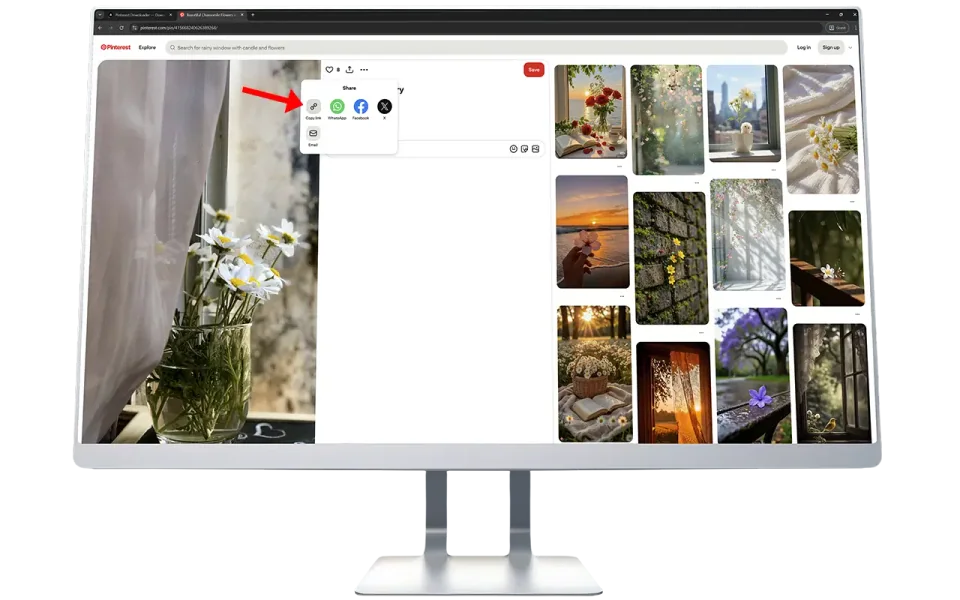
Open Pinterest in your browser or app. Find the video or image you want to download. Click Share → Copy Link.
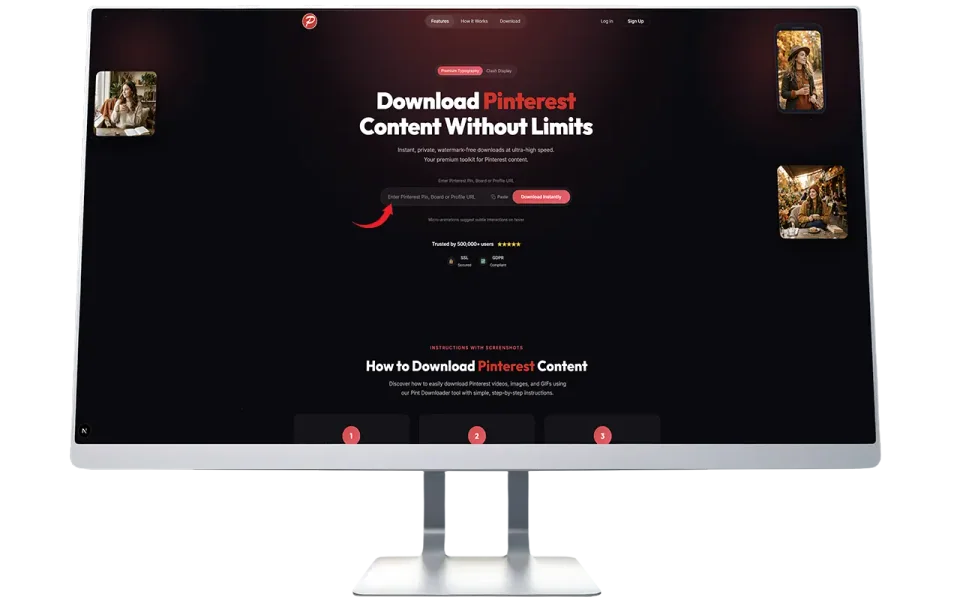
Paste the copied link into the input box at the top, and click “Fetch Media” button to start the process.
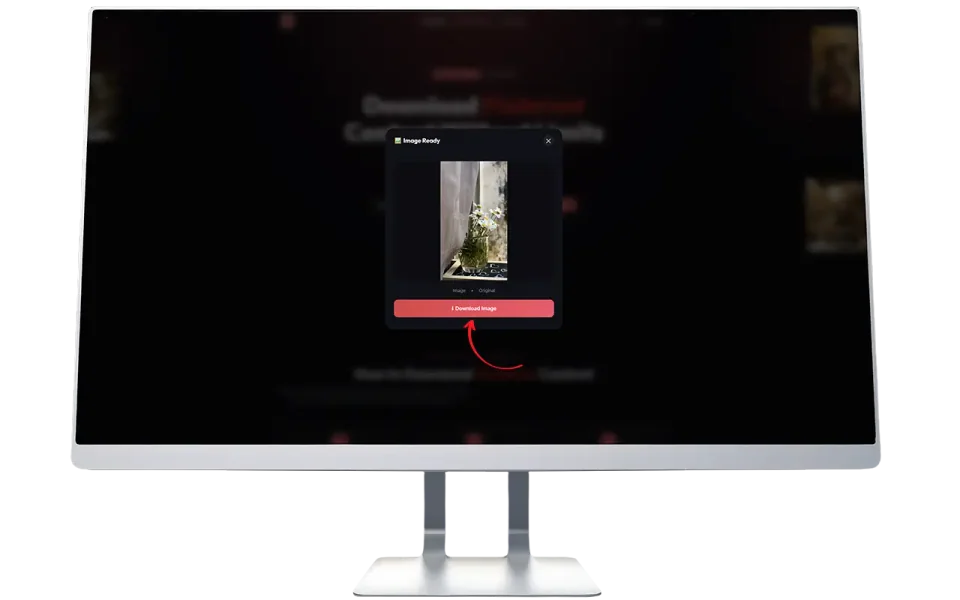
Wait a few seconds while we fetch the file from Pinterest’s servers. Click “Force Download” to store it on your device.
Instructions with Screenshots
Discover how to easily download Pinterest videos, images, and GIFs using our Pint Downloader tool with simple, step-by-step instructions.


What is Pinterest Downloader?
Pinterest Downloader is simply a free tool that helps you save Pinterest photos, videos and GIFs straight to your phone, tablet or desktop computer. With PintDownloader.com, you just copy the link of your favorite pin, paste it here, and download it in few seconds without Watermark. No sign-up, no apps to install, just quick, easy downloads for your personal use.
We built PintDownloader.com because we know how frustrating it can be when you find something inspiring on Pinterest but can’t save it easily. Whether it’s a recipe, a design idea, or a creative video, sometimes you just want to keep it handy offline.
Our goal was to make a simple, safe and free tool that lets our users quickly download their favorite Pinterest content without complicated steps, sign-ups, or unwanted software.
What Is PintDownloader?
PintDownloader is a simple, reliable tool that does exactly what it promises, it helps you download Pinterest videos, images, and GIFs quickly and easily.

Whether you are saving cooking tutorials, design inspiration, or just something cool you found, this tool makes it effortless. No signup, no apps, no watermarks. Just paste the link and grab your file.
- No app installation
- No signup
- No watermarks
You paste the Pinterest link, hit download, and you’re done. The file saves directly to your phone or computer in full quality.
It’s honestly one of the easiest ways to grab Pinterest content without jumping through hoops.
Do You Need to Create an Account?

Nope. One of the best things about PintDownloader is that it’s completely free and doesn’t require registration.
No email. No password. No verification codes.
Just open the site, paste your link, and download. It’s designed to be as simple as possible.
Can You Use It on Your Phone?
Yes, and it works just as smoothly as on desktop.
Whether you’re on iPhone or Android, the process is the same:
- Open Pinterest in your mobile browser (Safari, Chrome, etc.)
- Copy the link to the video or image
- Open PintDownloader.com in your browser
- Paste the link and download
The file will save to your phone’s gallery or downloads folder, depending on your settings. I have done this dozens of times on mobile, it’s fast and hassle-free.
Can You Download Pinterest Videos in HD?
Yes, absolutely. PintDownloader pulls the highest quality version available from Pinterest’s servers.
If the original creator uploaded a 1080p video, you’ll get 1080p. If it’s 720p, that’s what you’ll download. The tool doesn’t compress or downgrade quality – it grabs exactly what Pinterest has stored.
In my experience, most Pinterest videos are optimized for mobile viewing, so they’re usually between 480p and 720p. But you’ll always get the best version possible.
What If the Download Doesn’t Work?
I’ve run into this a few times, and here’s usually why:
- The link wasn’t copied properly (try again)
- The content was deleted by the creator
- The pin is private or restricted
- There’s a temporary glitch with Pinterest’s servers
If it fails, just double-check the link and try pasting it again. Most of the time, that fixes it.
Why People Use PintDownloader?

From what I have seen working with real users, here are the most common reasons:
- Save videos for offline viewing – Watch cooking tutorials, DIY guides, or fitness routines without needing Wi-Fi
- Collect inspiration – Designers, bloggers, and marketers often save visual references for projects
- Keep recipes handy – Download recipe videos so you can follow along in the kitchen without your phone timing out
- Share content easily – Send a video or image to friends via WhatsApp or email without linking them to Pinterest
- Build mood boards offline – Great for presentations, planning events, or creative brainstorming
I have personally used similar tools when working on client projects. Sometimes you just need the actual file, not another pin cluttering your boards.
Why Choose PintDownloader Over Other Tools?
There are plenty of Pinterest downloaders out there, but here’s why this one stands out:
✅ No watermarks – Your downloads are clean
✅ Fast processing – Files are ready in seconds
✅ No registration required – Just paste and go
✅ Works on all devices – Desktop, mobile, tablet
✅ Supports videos, images, and GIFs – All-in-one tool
✅ Free forever – No hidden fees or premium tiers
I’ve tested a lot of similar tools, and PintDownloader keeps it simple. No popups, no surveys, no nonsense.
Tips for Using PintDownloader Like a Pro

✅ Use it for content planning
If you’re a blogger or creator, save design ideas, color palettes, and layout inspirations for future projects.
✅ Download recipes before cooking
Save recipe videos so you can watch them in the kitchen without worrying about your screen locking or losing connection.
✅ Build offline mood boards
Download images and videos to create presentation decks, event planning boards, or creative briefs.
✅ Share content with non-Pinterest users
Not everyone has Pinterest. Download and send files directly via email or messaging apps.
How to Download Pinterest Videos, Images or Gifs?
PintDownloader.com makes it super simple to save Pinterest content, no sign-up, no limits, and no fees. Just follow the below quick steps:
- Open the Pinterest app or website and choose the video, image, or GIF you want to download.
- Tap the ••• icon.
- On the latest Pinterest app, this icon is at the bottom right.
- On older versions, it’s at the top right.
- Select Copy Link.
- Paste the copied link into the download box.
- Click or tap the “Media Fetch” button.
- A preview of your file will appear.
- Click the Force Download button to save it to your device.
Latest Updates & Improvements
You can track here our latest improvements, new features or performance enhancements. We are constantly evolving to serve you better.
⚙️ Update – September 27th, 2025
- Waiting Pop-Up Page Removed: Removed the waiting Pop-up page for seamless user experience and faster content delivery.
- Added an animated Progress Bar: We Added a beautiful animated progress bar with smooth transitions (Apple inspired) to make user experience much better.
- Increase Website Performance: Implemented an advanced caching system to increase fetching speed to increase engagement.
- Browser Extensions: Launched PintDownloader extension for Microsoft Edge, Mozilla Firefox and Chrome extension (More coming soon).
- Security Improved: Critical security vulnerabilities fixed in file processing system to improve data protection.
- Mobile Optimization: Redesigned the mobile interface with touch-friendly controls and responsive design.